Napisałem własnego asystenta kodowania z pomocą AI SDK
Asystenci kodowania pojawiają się jak grzyby po deszczu. Ostatnio każda firma, która ma własne modele, tworzy pod nie asystenta. A dodatkowo mamy Cursora czy Windsurf. Natomiast jest to na tyle proste, że sam zrobiłem swojego prywatnego asystenta kodowania i w tym wpisie tłumaczę jak to zrobić.
Zasada działania AI Coding Assistant
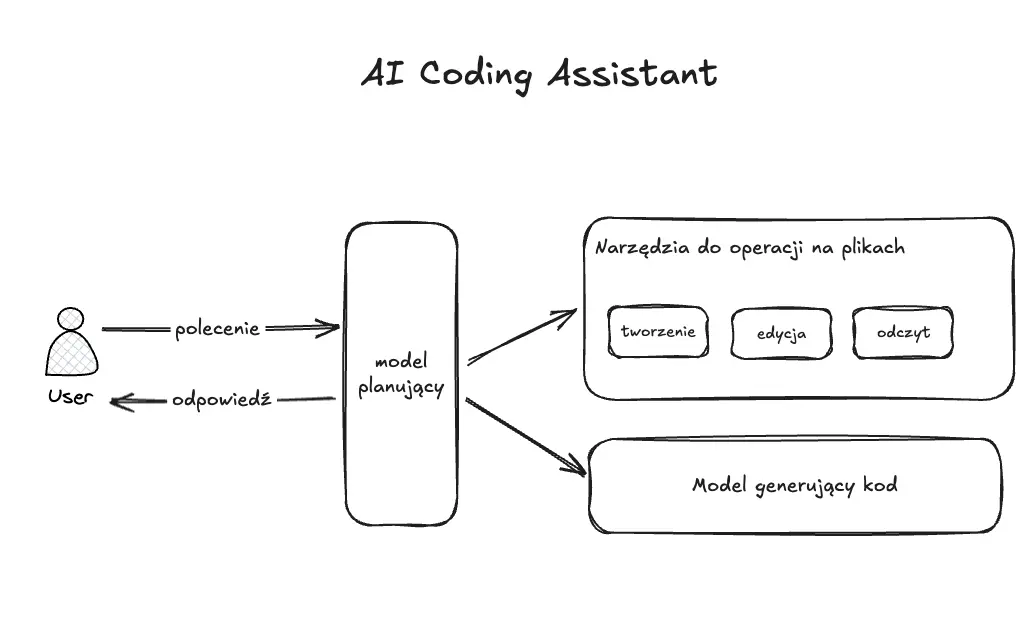
Jak się myśli o AI Coding Assistant to myślimy o ogromnych i skomplikowanych systemach. W końcu tworzenie kodu jest super skomplikowane więc agenci, którzy to potrafią też muszą. No i tutaj cię mogę rozczarować. Tworzenie kodu polega głównie na operacjach na plikach (czytanie, tworzenie, modyfikacja) i generowaniu kodu. Teraz posiadamy wystarczająco potężne modele, by dało się to napisać prosto
Do zbudowania podstawowego agenta potrzebujemy:
- jednego modelu głównego, który będzie wszystkim zarządzać (najlepiej reasoning)
- jeden model do generowania kodu (Claude Sonnet 3.7 albo Google Gemini 2.5 Pro)
- zestaw narzędzi do obsługi plików
Takie podejście daje nam sporo swobody w kontekście wyboru architektury i wybraniu najlepszych modeli do konkretnych zadań.
Robiąc to krok po kroku, to bardzo prosto można napisać prostego asystenta. Oczywiście gdybyśmy myśleli o wyjściu produkcyjnym i konkurowaniu z Cursor to czeka nas ogrom pracy związanej z optymalizacją, wsparciem dla zaawansowanych ścieżek itd. Natomiast napisanie własnego AI Coding Assistant to świetnie ćwiczenie na pisanie agentów.
Pisanie własnego AI Coding Assitant
Zanim pokaże jak stworzyć własnego asystenta, to parę założeń:
- będzie to narzędzie CLI
- chcemy zadbać o bezpieczeństwo wiec potwierdzamy akcje
- Langfuse do Observability
- korzystam z AI SDK
Zakładam, że wiesz jak korzystać z AI SDK. Szczególnie w kontekście używania narzędzi oraz budowania agentów. Jeśli nigdy nie pracowałeś/aś z AI SDK, to sprawdź mój DARMOWY ebook o tym.
Część 1 - CLI
Z racji tego, że CLI nie jest głównym elementem tej aplikacji, to zależało mi na czymś prostym, co pozwoli mi szybko tworzyć kod. Postawiłem na Clack i jestem mega zadowolony. Bardzo proste API i przydatne funkcje pozwalają łatwo tworzyć dowolne CLI. Z pomocą Clack'a stworzyłem główną pętlę aplikacji, która polega na komunikacji z użytkownikiem.
1async function main() {
2    intro('Welcome to AI Code Assitant')
3    while (true) {
4        const message = await text({
5            message: 'Your message',
6            placeholder: 'I want ...',
7        });
8
9        if (isCancel(message)) {
10            cancel('Operation cancelled.');
11            break;
12        }
13
14    //AI Part
15
16    log.message(completion.text)
17    }
18}
19
20main().catch((err) => {
21    console.error(err);
22}).finally(async () => {
23    outro('Bye')
24});
25
Kod jest banalnie prosty i czytelny nawet jeśli nigdy nie pracowałeś z biblioteką Clack. Mamy nieskończoną pętlę, która pyta użytkownika co zrobić i potem wypisuje wynik. Mamy dodatkowo zabezpieczenie przez ctrl+c, które pozwala wyjść z pętli (można by dodać też jakiś tekst na wyjście np.: exit).
Część 2 - Potwierdzenie akcji
Jednym z założeń jest możliwość potwierdzania akcji modelu, by mieć pewność, że wykonuje poprawne akcje. Tutaj napisałem kawałek generycznego kodu, który zadziała dla dowolnego narzędzia z AI SDK
1const executeWithConfirmationAndSpinner = <T extends Record<string, any>>(config: {
2    confirmationMessage: (params: T) => string;
3    actionMessage: string;
4    successMessage: string;
5    rejectionMessage: string;
6    actionFn: (params: T) => Promise<any> | any;
7}) => async (params: T) => {
8    const shouldContinue = await confirm({
9        message: config.confirmationMessage(params),
10    });
11
12    if (!shouldContinue || isCancel(shouldContinue)) {
13        return config.rejectionMessage;
14    }
15
16    const s = spinner();
17    s.start(config.actionMessage);
18    try {
19        const result = await config.actionFn(params);
20        s.stop(config.successMessage);
21        return result;
22    } catch (error: any) {
23        s.stop('Action failed.');
24        console.error("Error during action:", error);
25        return `Action failed: ${error.message}`;
26    }
27}
28
Tu jest parę rzeczy, na które warto zwrócić uwagę:
- Zaczynam od zapytania użytkownika, czy faktycznie chce wykonać akcję - tutaj pytanie jest sparametryzowane i mogę użyć wartości użytych do wywołania narzędzia
- Jeśli użytkownik się nie zgodzi, to zwracam informację o błędzie, którą wykorzysta model do wyświetlenia odpowiedzi
- Spinner - dla efektu wizualnego
- Wywoływana jest konkretna akcja i w momencie jak się skończy to zwracam rezultat do modelu głównego
Przykładowe użycie metody jest następujące:
1
2 execute: executeWithConfirmationAndSpinner({
3                        confirmationMessage: ({ task, language }) => `Do you want to generate ${language} code for: "${task}"?`,
4                        actionMessage: 'Generating code...',
5                        successMessage: 'Code generated',
6                        rejectionMessage: 'User rejected generating code.',
7                        actionFn: async ({ task, language }) => {
8                            const code = await generateCode(task, language);
9                            return code;
10                        }
11                    })
12
13
Wykorzystanie Higher Order Function i generyków pozwoliło uzyskać bardzo zgrabny kod.
Część 3 - Generowanie kodu
Ta część wbrew pozorom jest najłatwiejsza i jedyny problem to znalezienie odpowiedniego modelu, który będzie w stanie wygenerować kod odpowiedniej jakości.
1const generateCode = async (whatResultDoYouWant: string, language: string) => {
2    const completion = await generateText({
3        system: "You are experienced developer. You will be asked to generate code for a specific task. You will be given the task and you will generate the code for it. Code should be as simple as possible without additional description or versions. You won't create examples unless you are asked for it",
4        prompt: `Generate ${language} code for ${whatResultDoYouWant}`,
5        model: google('gemini-2.5-pro-exp-03-25'),
6        maxSteps: 5,
7        experimental_telemetry: {
8            isEnabled: true,
9            metadata: {
10                sessionId: sessionId
11            },
12        }
13    });
14
15    return completion.text;
16}
17
Ja zdecydowałem się na model Gemini 2.5 Pro i wraz z prostym promptem potrafi generować całkiem fajny kod.
Tu też nie ma filozofii, bo podajemy, co chcemy by stworzył oraz w jakim języku. Oczywiście tutaj dużo można zrobić odpowiednim promptem i odpowiednim pokierowaniem modelu.
Część 4 - Narzędzia do obsługi plików
Ostatnim elementem układanki są narzędzia do obsługi plików. To jest tak naprawdę 4 funkcje, które wykorzystują natywne metody z Node.js. Tutaj jest największa magia LLM - coś płynnego jak naturalny tekst jest w stanie przekształcić w konkretne zmienne. Dzięki temu możemy obsłużyć taki tekst bez dodatkowego interfejsu
1createFile: tool({
2                    description: 'Create file in location. Return path or message why it failed',
3                    parameters: z.object({
4                        fileName: z.string().describe('file name with relative path'),
5                    }),
6                    execute: executeWithConfirmationAndSpinner({
7                        confirmationMessage: ({ fileName }) => `Do you want to create file ${fileName}?`,
8                        actionMessage: 'Creating file...',
9                        successMessage: 'File created',
10                        rejectionMessage: 'User rejected creating file.',
11                        actionFn: ({ fileName }) => {
12                            const filePath = path.join(__dirname, fileName);
13                            // Ensure directory exists (optional, but good practice)
14                            const dirName = path.dirname(filePath);
15                            if (!fs.existsSync(dirName)) {
16                                fs.mkdirSync(dirName, { recursive: true });
17                            }
18                            fs.writeFileSync(filePath, '');
19                            return filePath;
20                        }
21                    })
22                }),
23                renameFile: tool({
24                    description: 'Rename file in location. Return new path or message why it failed',
25                    parameters: z.object({
26                        fileName: z.string().describe('current file name with relative path'),
27                        newFileName: z.string().describe('new file name with relative path'),
28                    }),
29                    execute: executeWithConfirmationAndSpinner({
30                        confirmationMessage: ({
31                            fileName,
32                            newFileName
33                        }) => `Do you want to rename file ${fileName} to ${newFileName}?`,
34                        actionMessage: 'Renaming file...',
35                        successMessage: 'File renamed',
36                        rejectionMessage: 'User rejected renaming file.',
37                        actionFn: ({ fileName, newFileName }) => {
38                            const filePath = path.join(__dirname, fileName);
39                            const newFilePath = path.join(__dirname, newFileName);
40                            fs.renameSync(filePath, newFilePath);
41                            return newFilePath;
42                        }
43                    })
44                }),
45                readFile: tool({
46                    description: 'Read file in location. Return content or message why it failed',
47                    parameters: z.object({
48                        fileName: z.string().describe('file name with relative path'),
49                    }),
50                    execute: executeWithConfirmationAndSpinner({
51                        confirmationMessage: ({ fileName }) => `Do you want to read file ${fileName}?`,
52                        actionMessage: 'Reading file...',
53                        successMessage: 'File read',
54                        rejectionMessage: 'User rejected reading file.',
55                        actionFn: ({ fileName }) => {
56                            const filePath = path.join(__dirname, fileName);
57                            const content = fs.readFileSync(filePath, 'utf8');
58                            return content;
59                        }
60                    })
61                }),
62                saveContent: tool({
63                    description: 'Save content to file in location. Return path or message why it failed',
64                    parameters: z.object({
65                        fileName: z.string().describe('file name with relative path'),
66                        content: z.string().describe('content to save'),
67                    }),
68                    execute: executeWithConfirmationAndSpinner({
69                        confirmationMessage: ({ fileName }) => `Do you want to save content to file ${fileName}?`,
70                        actionMessage: 'Saving content to file...',
71                        successMessage: 'Content saved',
72                        rejectionMessage: 'User rejected saving content to file.',
73                        actionFn: ({ fileName, content }) => {
74                            const filePath = path.join(__dirname, fileName);
75                            // Ensure directory exists (optional, but good practice)
76                            const dirName = path.dirname(filePath);
77                            if (!fs.existsSync(dirName)) {
78                                fs.mkdirSync(dirName, { recursive: true });
79                            }
80                            fs.writeFileSync(filePath, content);
81                            return filePath;
82                        }
83                    })
84                }),
85
Całość kodu odpowiedzialna za AI Coding Assistant
Cały kod prezentuje się następująco
1import { CoreMessage, generateText, tool } from 'ai';
2import { google } from '@ai-sdk/google';
3import { z } from 'zod';
4
5import { NodeSDK } from "@opentelemetry/sdk-node";
6import { getNodeAutoInstrumentations } from "@opentelemetry/auto-instrumentations-node";
7import { LangfuseExporter } from "langfuse-vercel";
8
9import fs from 'node:fs'; // Use direct import
10import path from 'node:path'; // Use direct import
11
12import {
13    confirm,
14    spinner,
15    isCancel,
16    cancel,
17    text,
18    log,
19    intro,
20    outro,
21} from '@clack/prompts';
22
23import { randomUUID } from "crypto";
24import { Langfuse } from "langfuse";
25
26const langfuse = new Langfuse();
27const sessionId = randomUUID();
28
29const sdk = new NodeSDK({
30    traceExporter: new LangfuseExporter(),
31    instrumentations: [getNodeAutoInstrumentations()],
32});
33
34const generateCode = async (whatResultDoYouWant: string, language: string) => {
35    const completion = await generateText({
36        system: "You are experienced developer. You will be asked to generate code for a specific task. You will be given the task and you will generate the code for it. Code should be as simple as possible without additional description or versions. You won't create examples unless you are asked for it",
37        prompt: `Generate ${language} code for ${whatResultDoYouWant}`,
38        model: google('gemini-2.5-pro-exp-03-25'),
39        maxSteps: 5,
40        experimental_telemetry: {
41            isEnabled: true,
42            metadata: {
43                sessionId: sessionId
44            },
45        }
46    });
47
48    return completion.text;
49}
50
51sdk.start();
52
53const messages: CoreMessage[] = [];
54
55const executeWithConfirmationAndSpinner = <T extends Record<string, any>>(config: {
56    confirmationMessage: (params: T) => string;
57    actionMessage: string;
58    successMessage: string;
59    rejectionMessage: string;
60    actionFn: (params: T) => Promise<any> | any;
61}) => async (params: T) => {
62    const shouldContinue = await confirm({
63        message: config.confirmationMessage(params),
64    });
65
66    if (!shouldContinue || isCancel(shouldContinue)) {
67        return config.rejectionMessage;
68    }
69
70    const s = spinner();
71    s.start(config.actionMessage);
72    try {
73        const result = await config.actionFn(params);
74        s.stop(config.successMessage);
75        return result;
76    } catch (error: any) {
77        s.stop('Action failed.');
78        console.error("Error during action:", error);
79        return `Action failed: ${error.message}`;
80    }
81}
82
83async function main() {
84    intro('Welcome to AI Code Assitant')
85    while (true) {
86        const message = await text({
87            message: 'Your message',
88            placeholder: 'I want ...',
89        });
90
91        if (isCancel(message)) {
92            cancel('Operation cancelled.');
93            break;
94        }
95
96        messages.push({
97            role: 'user',
98            content: message,
99        });
100
101
102        const completion = await generateText({
103            messages: messages,
104            model: google('gemini-2.0-flash'),
105            tools: {
106                createFile: tool({
107                    description: 'Create file in location. Return path or message why it failed',
108                    parameters: z.object({
109                        fileName: z.string().describe('file name with relative path'),
110                    }),
111                    execute: executeWithConfirmationAndSpinner({
112                        confirmationMessage: ({ fileName }) => `Do you want to create file ${fileName}?`,
113                        actionMessage: 'Creating file...',
114                        successMessage: 'File created',
115                        rejectionMessage: 'User rejected creating file.',
116                        actionFn: ({ fileName }) => {
117                            const filePath = path.join(__dirname, fileName);
118                            // Ensure directory exists (optional, but good practice)
119                            const dirName = path.dirname(filePath);
120                            if (!fs.existsSync(dirName)) {
121                                fs.mkdirSync(dirName, { recursive: true });
122                            }
123                            fs.writeFileSync(filePath, '');
124                            return filePath;
125                        }
126                    })
127                }),
128                renameFile: tool({
129                    description: 'Rename file in location. Return new path or message why it failed',
130                    parameters: z.object({
131                        fileName: z.string().describe('current file name with relative path'),
132                        newFileName: z.string().describe('new file name with relative path'),
133                    }),
134                    execute: executeWithConfirmationAndSpinner({
135                        confirmationMessage: ({
136                            fileName,
137                            newFileName
138                        }) => `Do you want to rename file ${fileName} to ${newFileName}?`,
139                        actionMessage: 'Renaming file...',
140                        successMessage: 'File renamed',
141                        rejectionMessage: 'User rejected renaming file.',
142                        actionFn: ({ fileName, newFileName }) => {
143                            const filePath = path.join(__dirname, fileName);
144                            const newFilePath = path.join(__dirname, newFileName);
145                            fs.renameSync(filePath, newFilePath);
146                            return newFilePath;
147                        }
148                    })
149                }),
150                readFile: tool({
151                    description: 'Read file in location. Return content or message why it failed',
152                    parameters: z.object({
153                        fileName: z.string().describe('file name with relative path'),
154                    }),
155                    execute: executeWithConfirmationAndSpinner({
156                        confirmationMessage: ({ fileName }) => `Do you want to read file ${fileName}?`,
157                        actionMessage: 'Reading file...',
158                        successMessage: 'File read',
159                        rejectionMessage: 'User rejected reading file.',
160                        actionFn: ({ fileName }) => {
161                            const filePath = path.join(__dirname, fileName);
162                            const content = fs.readFileSync(filePath, 'utf8');
163                            return content;
164                        }
165                    })
166                }),
167                saveContent: tool({
168                    description: 'Save content to file in location. Return path or message why it failed',
169                    parameters: z.object({
170                        fileName: z.string().describe('file name with relative path'),
171                        content: z.string().describe('content to save'),
172                    }),
173                    execute: executeWithConfirmationAndSpinner({
174                        confirmationMessage: ({ fileName }) => `Do you want to save content to file ${fileName}?`,
175                        actionMessage: 'Saving content to file...',
176                        successMessage: 'Content saved',
177                        rejectionMessage: 'User rejected saving content to file.',
178                        actionFn: ({ fileName, content }) => {
179                            const filePath = path.join(__dirname, fileName);
180                            // Ensure directory exists (optional, but good practice)
181                            const dirName = path.dirname(filePath);
182                            if (!fs.existsSync(dirName)) {
183                                fs.mkdirSync(dirName, { recursive: true });
184                            }
185                            fs.writeFileSync(filePath, content);
186                            return filePath;
187                        }
188                    })
189                }),
190                generateCode: tool({
191                    description: 'Generate code for task. Return code or message why it failed',
192                    parameters: z.object({
193                        task: z.string().describe('task to generate code for'),
194                        language: z.string().describe('programming language. Default: typescript')
195                    }),
196                    execute: executeWithConfirmationAndSpinner({
197                        confirmationMessage: ({ task, language }) => `Do you want to generate ${language} code for: "${task}"?`,
198                        actionMessage: 'Generating code...',
199                        successMessage: 'Code generated',
200                        rejectionMessage: 'User rejected generating code.',
201                        actionFn: async ({ task, language }) => {
202                            const code = await generateCode(task, language);
203                            return code;
204                        }
205                    })
206                }),
207            },
208            maxSteps: 5,
209            experimental_telemetry: {
210                isEnabled: true,
211                metadata: {
212                    sessionId: sessionId
213                },
214
215            }
216        });
217
218        log.message(completion.text)
219
220        messages.push({
221            role: 'assistant',
222            content: completion.text,
223        });
224    }
225
226}
227
228
229main().catch((err) => {
230    console.error(err);
231}).finally(async () => {
232    outro('Bye')
233    await langfuse.flushAsync();
234    await sdk.shutdown();
235});
236
Zachęcam, by sobie przejrzeć, skopiować i spróbować dorzucić coś od siebie. A najlepiej to spróbować samemu coś takiego napisać - nie jest to trudne, a daje sporo frajdy.